


🚀 Overview: What is OpenClaw?
OpenClaw is not just a simple chatbot, but a truly "productive" open-source AI Agent framework. It can execute real tasks on your computer, acting as a digital employee that can:
- 📧 Clean up emails and manage calendars
- 🖥️ Automate browser operations
- 📁 Execute system commands and run scripts
- 🔧 Extend skills and functionality on its own
Core Philosophy: Make AI not just answer questions, but actually complete tasks for you.The article originates fromSinsTu NI-https://www.sinstu.com/archives/483.html
🌟 Core Advantages of OpenClaw
🛡️ Privacy-Safe, Local Execution
- Cross-platform Support: macOS / Windows / Linux
- Flexible Models: Connect to Claude, GPT, or local models
- Data Security: Data stays on your machine by default, extremely high privacy
💬 Multi-Platform Seamless Integration
Use it in almost any chat software:The article originates fromSinsTu NI-https://www.sinstu.com/archives/483.html
- Domestic Platforms: WeChat, QQ, Enterprise WeChat, Feishu, DingTalk
- International Platforms: Telegram, Discord, Slack, Signal, iMessage
- Multiple Channels: Official accounts, mini-programs, and other enterprise ecosystems
🧠 Intelligent Learning and Memory
- Persistent Memory: Remembers your preferences and habits
- Context Understanding: Understands complex conversation logic
- Behavioral Learning: Gets to know your work patterns the more you use it
🔧 Powerful System-Level Capabilities
- File Operations: Read and write various types of files
- Command Execution: Run system commands and scripts
- Permission Control: Configurable full control or sandbox isolation mode
- Browser Automation: Automatically browse web pages, fill forms, scrape data
📚 Unlimited Skill Extension
- Community Skill Library: Use hundreds of existing skills
- Custom Development: Easily write your own skills
- AI-Assisted Development: Even let OpenClaw help you write skills
📦 Preparation Phase: Essential Software Installation
1. Download Essential Tools
Git Installation (Version Control System)
Download Address: https://mirror.nju.edu.cn/github-release/git-for-windows/git/LatestRelease/Git-2.53.0-64-bit.exeThe article originates fromSinsTu NI-https://www.sinstu.com/archives/483.html
NodeJS Installation (JavaScript Runtime Environment)
Download Address: https://mirrors.ustc.edu.cn/node/latest/node-v25.8.0-x64.msiThe article originates fromSinsTu NI-https://www.sinstu.com/archives/483.html
2. Installation Steps
- Double-click the downloaded installation package
- Click "Next" following the wizard
- Accept the license agreement
- Keep the default installation path
- Complete the installation
3. Verify Installation
Open PowerShell and run the following commands respectively:The article originates fromSinsTu NI-https://www.sinstu.com/archives/483.html
git --version
node --version
npm --version
🔑 AI Model Access Preparation
1. MiniMax Model Configuration
- Register Account: Visit https://platform.minimaxi.com/user-center
- Real-name Authentication: Complete identity verification
- Account Recharge: ¥15 trial credit after real-name verification
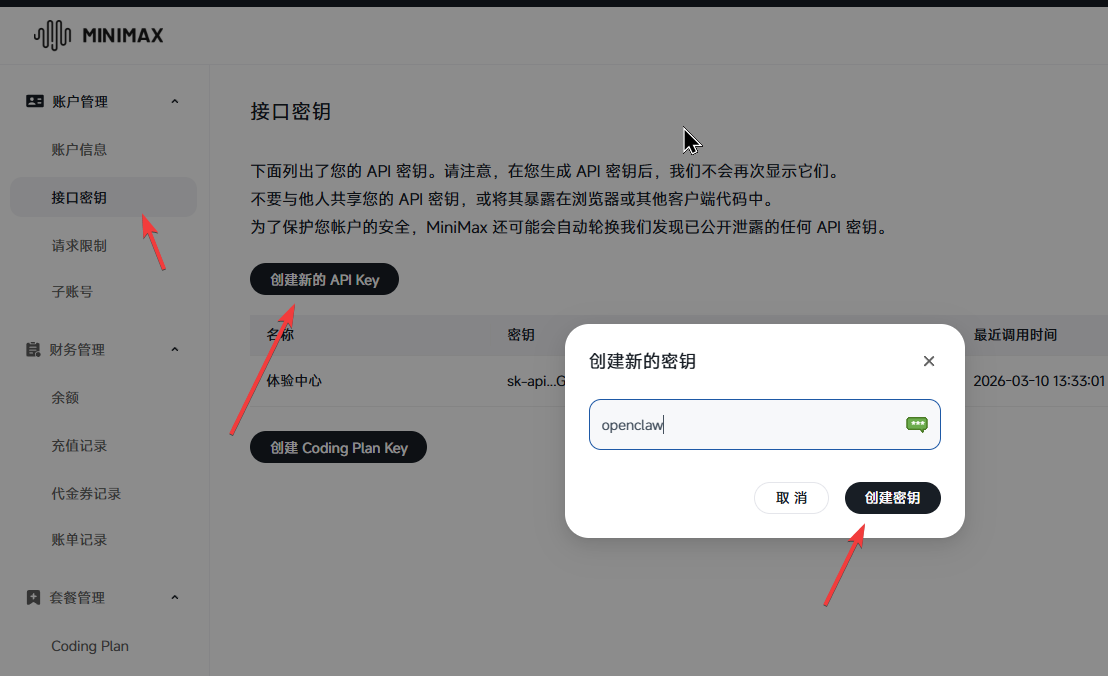
- Get API Key:
- Click "Create Key"
- Copy the key starting with
sk-api- - Important: The key can only be copied once, please save it properly
2. QQ Bot Preparation
- Visit Page: Open https://q.qq.com/qqbot/openclaw/login.html
- Mobile QR Code Login: Use mobile QQ to scan the QR code
- Create Bot: Create a bot following the wizard
- Get Credentials: Record the bot token information
🛠️ OpenClaw Installation and Configuration
Step 1: Open PowerShell as Administrator
- Method 1: Right-click Start menu → Windows Terminal/PowerShell (Administrator)
- Method 2: Win + X shortcut → Windows Terminal/PowerShell (Administrator)
- Method 3: Search "powershell" in Start menu → Right-click and run as administrator
Step 2: Install OpenClaw Chinese Version
# Set PowerShell execution policy
Set-ExecutionPolicy Restricted -Scope CurrentUser

# Configure npm mirror source (domestic acceleration)
npm config set registry https://registry.npmmirror.com

# Install OpenClaw Chinese version
npm install -g @qingchencloud/openclaw-zh@latest

# Verify installation
openclaw --version
Expected Output: OpenClaw 2026.3.8 (3caab92)The article originates fromSinsTu NI-https://www.sinstu.com/archives/483.html
Step 3: Initialize OpenClaw
Run the initialization wizard:The article originates fromSinsTu NI-https://www.sinstu.com/archives/483.html
openclaw onboard --accept-risk🔧 Basic Configuration
- Initialization Mode: Select "Quick Start"
- Gateway Port: 18789 (default)
- Gateway Binding: 127.0.0.1 (local access)
- Gateway Authentication: Token mode (default)
🤖 AI Model Configuration
- Provider Selection: MiniMax
- Authentication Method: MiniMax M2.5 (Domestic Version)
- API Key: Paste the MiniMax key you copied earlier
- Default Model: Keep minimax-cn/MiniMax-M2.5
⚙️ Feature Configuration
- Search Function: Skip for now
- Skill Configuration: Recommended to install suggested skills
- Hooks Enable: Recommended to enable the following Hooks:
- 🚀 boot-md (boot marker)
- 📎 bootstrap-extra-files (extra file bootstrap)
- 📝 command-logger (command log)
- 💾 session-memory (session memory)
Step 4: Optional Feature Installation (FFmpeg)
If you need QQ bot to support audio and video functions, install FFmpeg:The article originates fromSinsTu NI-https://www.sinstu.com/archives/483.html
# Install Chocolatey (Windows package manager)
iwr https://chocolatey.org/install.ps1 -UseBasicParsing | iex

# Install FFmpeg
choco install ffmpeg
Step 5: Configure QQ Bot Plugin
# Install QQ bot plugin
openclaw plugins install @sliverp/qqbot@latest

# Add QQ bot channel
openclaw channels add --channel qqbot --token "YourBotToken"

# Start gateway service
openclaw gateway
🌐 Web Management and Permission Configuration
1. Open Web Management Interface
openclaw dashboardVisit http://localhost:18789 to enter the management interface.The article originates fromSinsTu NI-https://www.sinstu.com/archives/483.html
2. Relax Permission Restrictions (Optional but Recommended)
⚠️ Note: This will give OpenClaw more system permissions, please make sure you understand the risks.The article originates fromSinsTu NI-https://www.sinstu.com/archives/483.html
openclaw config set tools.profile full3. Register as System Service (Auto-start on Boot)
# Install as system service
openclaw daemon install

# Verify service status
openclaw status

# If you need to uninstall the service
openclaw daemon uninstall
🎯 Practical Application Scenarios
📧 Email Automation (Save Hours Daily)
Scenario: Automatic email classification and reply
- Trigger Condition: New email arrives
- Automatic Actions:
- Urgent emails → Immediate notification
- Spam emails → Automatic archiving
- Customer inquiries → Generate reply drafts
- Invoice emails → Create accounting tasks
Example Command: Check inbox every 30 minutes; move invoice emails to /Finance folder; generate 3 reply options for customer inquiries.
💻 Code Quality Guardian (Developer's Best Friend)
Scenario: GitHub PR automatic review
- Trigger Condition: PR creation or update
- Automatic Actions:
- Run static code analysis
- Generate refactoring suggestions
- Automatically write test cases
- Check code standards
Example Command: Automatically run lint check when PR is created; generate 5 refactoring suggestions; list improvement points in PR comments.
📊 Daily Smart Briefing (Information Aggregation)
Scenario: Cross-platform information summary
- Trigger Time: 08:00 CST daily
- Aggregated Content:
- Daily schedule
- Unread important emails
- GitHub Issue status
- CI/CD pipeline status
- Push Channels: Telegram, WeChat, QQ, etc.
⚠️ Important Considerations
1. Security Risk Control
- API Key Management: Properly safeguard all third-party API keys
- Permission Minimization: Only grant necessary system permissions
- Sensitive Data Encryption: Recommend encrypting important data
- Regular Backups: Regularly backup configuration and data
2. Operations and Maintenance
- Log Monitoring: Regularly check gateway logs
- Version Updates: Pay attention to OpenClaw version updates
- Skill Maintenance: Regularly update community skills
- Performance Monitoring: Monitor resource usage
3. Cost Control
- API Call Costs: Pay attention to AI model API call costs
- Server Resources: Long-term operation requires considering hardware resources
- Skill Licensing: Some advanced skills may require payment
🤝 Community Support and Resources
Official Resources
- Chinese Version Repository: https://github.com/1186258278/OpenClawChineseTranslation
- Skills Repository: https://github.com/clawdbot-ai/awesome-openclaw-skills-zh
- Official Documentation: https://docs.openclaw.ai
Success Case References
- Email Automation: https://openclawai.io/use-cases/
- Developer Tools: https://myclaw.ai/use-cases
- Enterprise Applications: https://www.gradually.ai/en/openclaw-use-cases/
📈 Advanced Usage Tips
1. Skill Development Getting Started
OpenClaw supports custom skill development, you can:
- Modify based on existing skills
- Use community templates to create new skills
- Let OpenClaw help you write skill code
2. Multi-Agent Collaboration
You can configure multiple OpenClaw instances to achieve:
- Task division and collaboration
- Load balancing
- Fault switching
3. Third-Party Service Integration
OpenClaw can easily integrate:
- GitHub Actions
- Slack/Discord Webhooks
- Enterprise WeChat API
- Custom Web Services
🎉 Start Your AI Assistant Journey
Through this guide, you have completed:
- ✅ OpenClaw environment preparation
- ✅ AI model access configuration
- ✅ QQ bot integration
- ✅ Basic function testing
- ✅ Practical application understanding
Next Steps Recommendations:
- Start with simple email automation
- Gradually add more skills
- Participate in community exchanges and share experiences
- Develop your own custom skills
The power of OpenClaw lies in its extensibility and practicality. As you use it more deeply, you'll discover more surprising application scenarios. May you double your work efficiency and make life easier with the help of AI assistants!
About the Author
Focused on AI tool application and automation solutions, dedicated to helping users improve work efficiency through AI technology.
Comments